

Hello, blog!
It’s been a bit since my last post – about 2 months, to be “precise” (which is a very incorrect loose definition of the term).
Originally, I hadn’t planned for it to take so long to post other things, especially since I had at least one other post written and largely alright to post. But I wasn’t really happy with how it was at that point, and shortly after I lost motivation for doing anything relating to this blog in general.
I haven’t been doing nothing though – in lieu of regular employment at the moment, I have been working on a couple of personal projects, all the while managing my health, as I’m still recovering from the sickness I had in November. It was quite destabilising, but I’m getting better, albeit a bit up and down at times. I think my current sleep pattern isn’t helping, but I’m working on that. Hopefully I’ll feel a lot better soon.
There’s one project in particular that has been taking up a lot of my time and brainpower, and I plan on talking about that pretty soon, as I’m at an impasse and feel like I need to write a bit about it in one (or three or five) of these posts in order to move forward with it. But I’ll get there.
Today, I want to talk about my Wii U.
You own a Wii U?
Yeah, I do.
I got it back in May of 2016, after Nintendo announced the original Super Mario Maker (SMM) in September of 2015.
I had played a few of the New Super Mario Bros. games – mostly at friends houses, but I also owned a copy of the original New Super Mario Bros. for the DS. Those games were very fun, but I always felt they were missing something – the ability to create custom levels. They were the perfect type of game to have a level editor, but to my disappointment there was none.
Which is why I got really excited when Mario Maker was announced and came out. So much so, that I struck up a deal with my parents to allow me to get a second-hand Wii U and a copy of MM1 (Okay, technically there was no deal struck, they did it for me as an exercise in taking out a loan, but it doesn’t sound as cool :P)
I had a lot of fun with the game! I made a number of levels, most of which never ended up getting verified because although I created cool levels, I sucked at playing them. There were a few that got published, and they were pretty neat. But in the end, I stopped enjoying the game about 6-12 months after I got it, and really haven’t touched it since.
Of course, I know how much of a flop the Wii U ultimately was, with it being superseded by the Switch two years later, and most if not all the games that were on the Wii U being ported or remade for the Switch. Including Mario Maker 2, which from what I’ve seen is better in every way compared to MM1. (Little disappointed about that, but oh well.)
But, for a number of reasons, I never got a Switch, and I didn’t own any other Wii U games, so there wasn’t a lot for me to do with it. I did borrow a few games from my local library and played those, but the times I did that are few and far between.
By and large, I just left my Wii U to sit untouched, unplayed, and unloved. (This is important, and I’ll get to why in a bit.)
What motivated you to revisit it?
It was after I’d been researching the homebrewing stuff for my DS, that I came across a video in my YouTube feed titled something like “How to homebrew your Wii U with Tiramisu” or something like that. My reaction to seeing that was basically:
“You can fuckin’ mod the Wii U?!”
Since I had a Wii U, wasn’t doing much with it, and thoroughly enjoyed the process of learning to homebrew my DS, I immediately became interested in learning how to homebrew my Wii U. Not for any end goal in particular, just to do it for the sake of learning something new.
(On a slight aside, there’s probably a number of things that I can do with a modded Wii U – possibly the most exciting is the prospect of emulation, but I don’t know anything about that yet.)
I remembered that Parental Controls had been set up on the console back when it was first set up almost 8 years ago, and I didn’t know if it would cause any issues when trying to mod the console. So I went and got the code, booted up the console, and went and tried to open the Parental Controls for the first time in forever.
But then I was met with this:
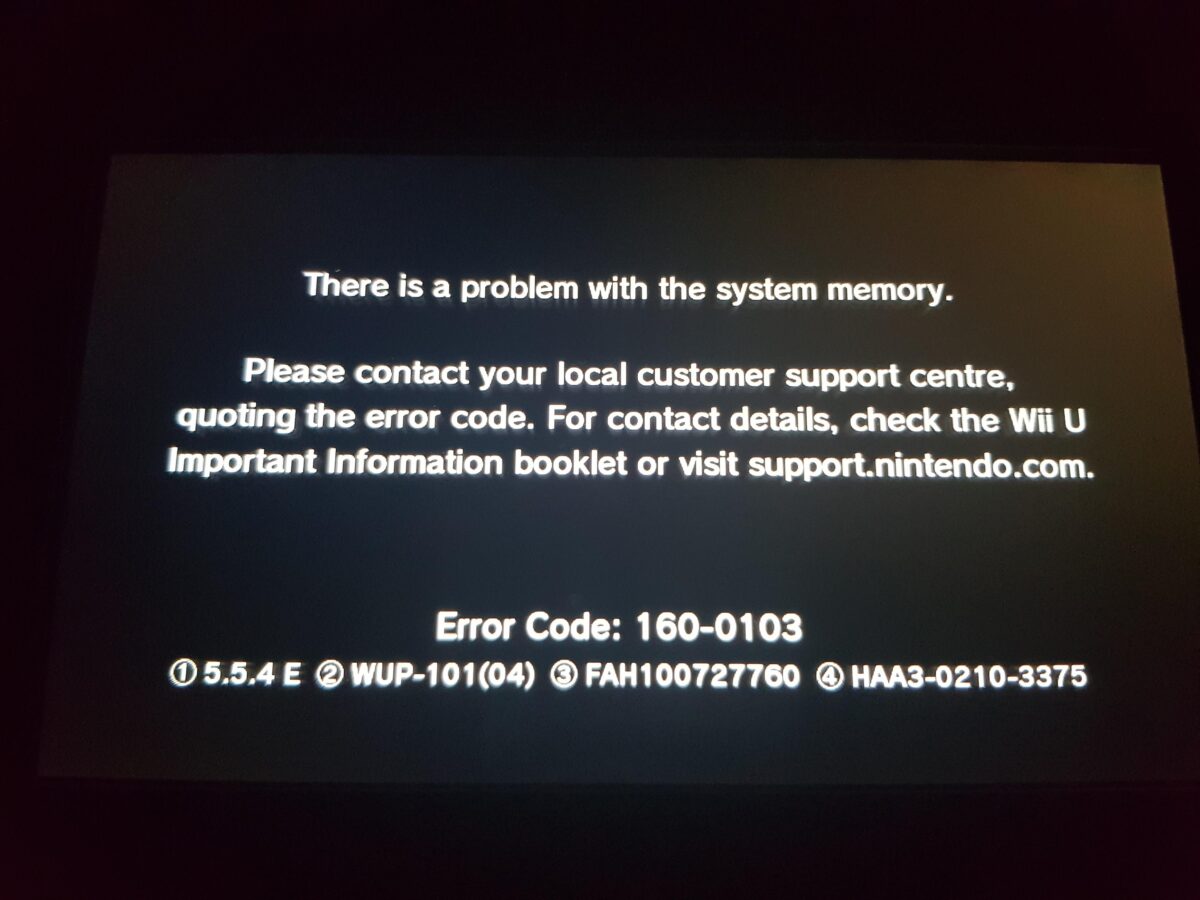
(Note: This isn’t my picture, but the error is the same, albeit with slightly different console details.)
This caught me off guard, and initially I had zero clue why it was happening. But it was happening consistently; every time I tried to open the Parental Controls app the whole console would crash like this. I tried to open a few other apps as well, and some of them caused the same error. One had an error with a different code (160-2215), but it crashed the console all the same.
Following this, I frantically searched online for this error to try and figure out what was going on. It seemed to be a well-known issue, since there were several articles and MANY forum posts regarding this error. After going back and forth amongst forum posts, and finally landing on and reading through a troubleshooting guide written in November of last year, I managed to get a decent idea of what was going on.
✨ My Wii U is dying ✨
So according to what I read, it seems a number of consoles produced back in/around 2013 had an issue with the media card which held the console’s NAND memory, where all the long-term device storage is typically held. It only started showing up relatively recently – people largely started noticing it when the eShop for the 3DS and Wii U were announced to be shut down in March of 2023, and they went to claim what they could while it was still operational.
The issue impacts only a specific subset of the Wii U consoles – specifically, the 32GB models with cards manufactured by Hynix. It also seemed to be brought on by a lack of use (hence why that last comment I made before was important). I’m not sure what the issue actually comes from, and I haven’t seen anyone else talk about the cause, but I don’t think it matters.
Ultimately, it’s caused a large number of consoles to fail or start failing, putting many of them into a bricked state. Thankfully, my console hadn’t yet gotten to that point, and still hasn’t, but it would seem to be a looming issue that will only get worse if nothing is done about it. Eventually, it would brick my console too.
So what am I to do about it?
What I am to do about it
Research
I spent a bit of time after that going through the forum posts I found, trying to figure out both
- How to figure out for certain (or to like 98% certainty) if the problem I am having is actually a failing media card (eMMC), and
- How to then solve the issue of a failing eMMC.
Pretty much all of the information I needed I found either in this post, or a post that was linked to from this post:
There are several common problems Wii Us run into. Some symptoms have a varaity on causes and some problems have different solutions. This is primarily a meta guide designed to diagnose the cause of the problem...
I ended up figuring out more about the second point first, and it turns out there are 2 main methods for fixing a failing eMMC:
- The Much Harder, More Robust Method – physically redirect the pins on the motherboard going into the eMMC, to a microSD card. This requires decent soldering skills, which I don’t have.
- The Not As Hard But Still Fairly Hard, Temporary Method – alter the firmware in order to redirect the storage to an SD card plugged into the front of the console.
Both main methods completely rebuild the NAND’s contents from scratch. The first method allows the console to run the default, unmodified firmware, while the second doesn’t, from what I can tell.
I don’t have the confidence or ability yet to be able to solder a new chip into place without breaking the console, so I reckoned (and still reckon) I would go with the easier option of the two for now, and upgrade to the harder option if I end up having the ability and desire to do so.
But did I even need to do this, or am I missing the mark and having a completely different issue? I wasn’t going to start doing any repairing until I could figure this out for certain.
The troubleshooting guide (as linked above) states that there are a few things to look out for that indicate that this is indeed the problem:
- Crashes occur after startup – Yep
- The console is a 32GB model – Yep
- The media card is a Hynix chip – I’d have to open up the console to figure this out, and looking at the disassembly instructions, I reckon I’d probably break it trying to do so
However, the guide also states that you can get 100% confirmation by dumping and viewing the crash logs, and looking for instances of MEDIA ERROR and DATA CORRUPTION that concern dev:mlc01, like this:
10:48:16:325: FSA: ### MEDIA ERROR ###, dev:mlc01, err:-2228230, cmd:11, path:(null)
But how do you dump the logs? From what I read, there are two ways of doing this:
- If the console can run homebrew, use an SD card to install Tiramisu or Aroma and then use the WiiUCrashLogDumper homebrew app to save the logs to the SD card – this way is ideal, since it’s a lot simpler to do, and the process for setting up these custom firmwares (CFW) is well documented
- Otherwise, use a Raspberry Pi Pico, and two pieces of software called UDPIH and recovery_menu – this seemed to be a lot more fiddly
So obviously, if I could install either Tiramisu or Aroma on my console, that would be ideal. But at this point, I didn’t know what state my console was in, and whether it would be capable of installing homebrew, or if the eMMC was too far gone. I’d only seen a couple of errors at this point, and hadn’t looked any further.
Time to look further, then.
Analysing the console’s state
I spent about a whole afternoon figuring out what was broken and what wasn’t. Basically, I just went through pretty much every app and feature on the console, starting or activating each one and documenting the response.
Overall, my console is actually in a pretty decent state. Only a few things are broken, however one of those things is pretty damn annoying.
Here’s what I documented:
Analysis of Wii U initial state
As you can see, most things work. There are 4 apps that crash upon trying to access them, three of which give the relevant 160-0103 system memory error. (I might be wrong, but I suspect the two amiibo-related apps came from a previous owner of the console. It is second-hand, after all.)
HOWEVER. One of the things I tested was the console’s ability to switch languages, and while I could switch to German fine, thinking there’d be no issue, I could not switch it back into English. I tried multiple times, and it hung every time. I even tried Spanish, just to see if I could switch into another language, but that didn’t work either. I don’t know how the Wii U sets up the system language, but my guess would be that both of these language setups are partially corrupted, given the console’s dying state.
The point is, my console is now stuck in German. I don’t read German, so I can’t understand any of the text, short of entering it into Google Translate and figuring it out from there. So that’s annoying.
But, this analysis gave me confidence that I would be able to install custom firmware and homebrew apps without significant issue. So, after going out and buying myself a 64GB High Endurance SD card (there’s a couple of reasons for this one specifically), It was time to figure out how to do just that.
Installing Tiramisu (and Aroma)
I had already read the installation guide a couple of times prior to doing this, and gave me a pretty good idea of the process of installing Tiramisu.
But it shows how to install Aroma, not Tiramisu! Indeed. Turns out, in between the last time I read it and now, the maintainers of this guide switched from using Tiramisu to Aroma. I had read about Aroma before, but it still seemed as though it was in development and not really ready to be used. Turns out that’s not the case.
However, I had become familiar with the Tiramisu instructions, and wasn’t confident at this point that Aroma would have no issues. (Fairly baseless doubt, but whatever.) So I decided to start with Tiramisu, and come back and install Aroma after, once I got it working.
I won’t explain the full process here, as it’s quite lengthy and specific, and I don’t think I could do a good job of it. If you want the full process, check out the hacking guide:

But the gist of it is:
- Format, and load the appropriate files onto, the SD/microSD card
- Perform a web exploit to load the payload file
- Backup the contents of the NAND onto the SD card – this is where it’s handy to have a 64GB card, if your console has 32GB of internal storage, like mine
- Install PayloadLoader to automatically load the payload by running Health & Safety, rather than performing the web exploit
- Autoboot that on startup, and select default environments and menus
- Block updates so nothing breaks accidentally from an update
As you can see, it’s a bit of bootstrapping to get it running initially, but it works, and works quite well. I have to say thank you to the people who figured this out and documented it, just for how easy it was to set it up with pretty much no prior knowledge.
This ended up taking me a couple of afternoons, as the NAND backup took a while to do. But I got Tiramisu working, and then added the appropriate files for Aroma to get that working.
I learned a couple of things that aren’t explicitly stated in the guide, which are useful to know:
- Nothing is actually installed directly to the console, aside from the PayloadLoader. Everything other file is loaded from the SD card every time the PayloadLoader is run, meaning that you have to have the appropriate files present if you want to run them. So, for example, if the files for Tiramisu aren’t on the card, it won’t show up as an option in the environment loader.
- The boot order for CFW looks like this:
- Payload Loader (Accessed by holding B)
- Environment Loader (Accessed by holding X)
- Boot Selector (Accessed by holding START)
- Home menu
Homebrew and crash logs
After getting Aroma working, I played around a bit with some homebrew software, just to see what there was. After all, I just figured out how to homebrew my Wii U! That’s pretty damn exciting.
I didn’t do anything specifically that I can remember, just the homebrew app store – which has some rather bold background music, in my opinion.
But then after playing around for a bit, I installed the aforementioned WiiUCrashLogDumper app and, well, dumped the crash logs.
Then I opened up the SD card on my PC, and took a look at the log files.
The verdict
So after all of that, I can now confidently say that (drumroll please)…
. . . (padadadadadada) . . .
It’s definitely the eMMC. It’s most certainly failing.
The logs showed pretty much the exact same error messages as given by the troubleshooting guide. (Well, except for the timestamp I think)
So the good news is, I know what the problem is, and can go about fixing it. Bad news is, there’s most certainly a time limit, as at some point the eMMC will fail completely, or at least beyond easy repair. While it’s still possible to recover the console from a more busted state, the process for doing so is much harder, from what I can tell.
But that will come when I am ready to deal with it. For now, that’s where I am at.
This took me a bit of time to actually write. I wrote the first half in one and a half sittings, and then took a week or so to write the second half. I think the second half of this post suffered because of it, but I think that’s alright.
I thought about waiting until I had completely finished the process before making a post about it, but I realised that A. it was taking a while and I was likely to forget what I had done before writing about it, and B. this post is getting quite long now, so if I had waited it would probably be much longer, and potentially to long for a comfortable read.
I don’t really know whether that’s true though. I’m still new to blogging, and this is only my second proper post, and currently I don’t have any feedback. I’ll have to wait until people actually start reading this before I know.
Anyway, that’s it for now. If you have anything you want to discuss from this post or any corrections you think I should make, send me an email at:
nacho.blog@mrnachowagon.com
I’ll probably reply eventually.